
Notice
Recent Posts
Recent Comments
Link
뭐야 왜 an 돼
RESTful API로 레시피 목록 가져오기: Python과 Flask 활용(Selecet) 본문
Flask RESTful API: 레시피 조회
아래 코드는 Flask RESTful을 사용하여 레시피를 조회하는 API 엔드포인트를 정의한 것입니다. 각 부분을 단계별로 설명해 드리겠습니다.
중요 부분
- select문은 cursor가 가져올 때 dictionary=True: select 문을 실행할 때 커서를 딕셔너리 형태로 가져오도록 설정하여 JSON 형태로 데이터를 반환합니다.
- DB에서 가져온 timestamp는 파이썬에서 datetime으로 자동 변환: 데이터베이스에서 가져온 timestamp는 파이썬에서 datetime으로 자동 변환됩니다. 이를 문자열로 변환하여 JSON으로 보낼 수 있도록 합니다.
코드 설명
GET 메소드 처리
def get(self):
    # 클라이언트가 보낸 데이터가 있으면 받아준다.
    offset = request.args['offset']
    limit = request.args['limit']

    # DB로부터 데이터를 가져온다.
    try:
        connection = get_connection()

        query = '''select *
                    from recipe
                    limit '''+offset+''', '''+limit+''';'''

        # 중요!! select문은 cursor가 가져올 때 dictionary=True
        cursor = connection.cursor(dictionary=True)
        cursor.execute(query)

        result_list = cursor.fetchall()

        # DB에서 가져온 timestamp는 파이썬에서 datetime으로 자동 변환되는데 datetime은 json으로 보낼 수 없다
        # 따라서 시간을 문자열로 변환해서 보내준다
        for row in result_list:
            row['created_at'] = row['created_at'].isoformat()
            row['updated_at'] = row['updated_at'].isoformat()

        cursor.close()
        connection.close()

    except Error as e:
        if cursor is not None:
            cursor.close()
        if connection is not None:
            connection.close()
        return {'result' : 'fail', 'error' : str(e)}, 500

    # 클라이언트에 json 만들어서 응답한다.
    return {'items' : result_list,
            'count' : len(result_list),
            'result' : 'success'}
이 코드는 클라이언트가 전달한 오프셋(offset)과 리미트(limit)를 사용하여 데이터베이스에서 레시피를 조회합니다. 조회된 결과를 JSON 형태로 반환하기 위해 cursor를 딕셔너리 형태로 가져옵니다. 또한 데이터베이스에서 가져온 timestamp를 문자열로 변환하여 JSON으로 보냅니다.
전체적인 흐름
- GET 메소드 처리: 클라이언트가 전달한 오프셋(offset)과 리미트(limit)를 사용하여 데이터베이스에서 레시피를 조회합니다.
- 클라이언트 응답: 조회된 결과를 JSON 형태로 클라이언트에 반환합니다. 결과는 레시피 목록(items), 목록 개수(count), 및 성공 여부(result)를 포함합니다.
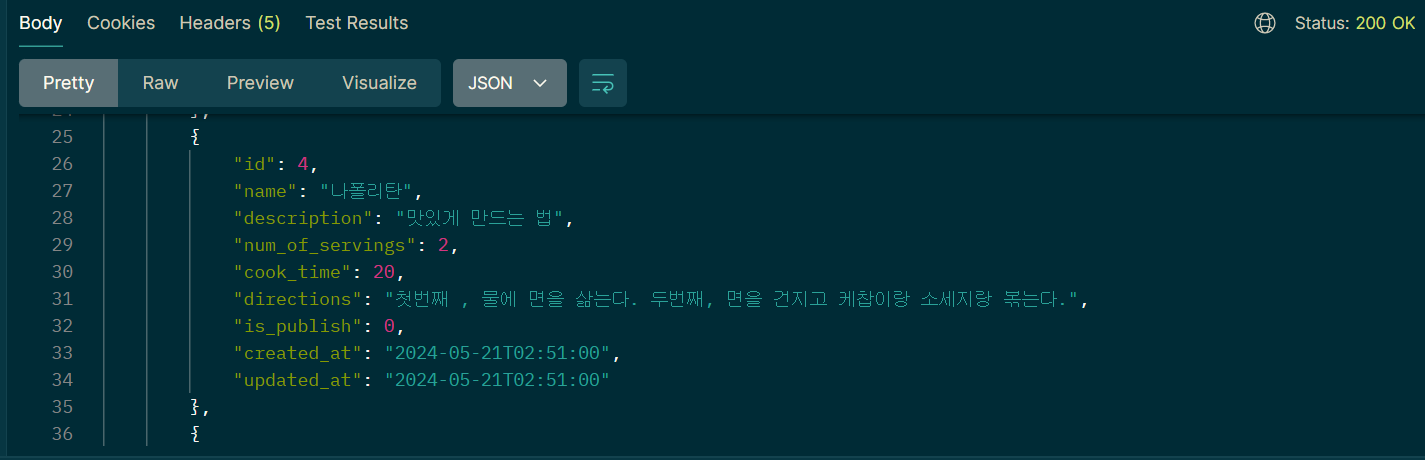
Vscode 에서 터미널 > flask run 으로 서버 실행한 후
포스트맨에서 Send 하고 상태 코드가 200 OK인지 확인, success 인지 확인
'RESTful API' 카테고리의 다른 글
| Python MySQL Connector Delete (0) | 2024.05.21 |
|---|---|
| Python MySQL Connector update (0) | 2024.05.21 |
| Python을 사용한 MySQL 데이터베이스 연결 설정 (0) | 2024.05.21 |
| Python MySQL Connector insert 하는 방법 (Flask,Post man) (0) | 2024.05.21 |
| Flask로 RESTful API 서버 개발, Resource 클래스 활용 (5) | 2024.05.21 |
'RESTful API' Related Articles
more


